
Your phone tells you the time, your phone tells you the weather, and your phone already counts your steps poorly from your pocket. So why add a watch? Because the best smartwatches put the useful data on your wrist, track workouts without strapping a phone to your arm, and quietly nudge you to move, sleep, and recover. In 2026, the choice is simpler than ever: Apple Watch for iPhone owners, Galaxy Watch for Android, and Fitbit for the fitness-first crowd. This guide covers the best smartwatches with honest advice on battery and features.
Quick verdict
For iPhone owners, the Apple Watch Series 10 is the best smartwatch: the biggest display, the most mature health features, and the deepest iPhone integration. For Android users, the Samsung Galaxy Watch 7 is the best all-rounder. If battery life and simplicity matter more than apps, the Fitbit Charge 6 is the smarter tracker.
Who this guide is for
This guide is for anyone choosing between a smartwatch and a fitness tracker, including iPhone and Android users who want health tracking, notifications, and everyday convenience.
Who should skip these picks
Skip smartwatches if you want week-long battery life and deep training metrics; a Garmin or dedicated tracker is the right tool. Skip Apple Watch if you use Android, and skip Galaxy Watch if you want the best compatibility with non-Samsung Android phones, where a Pixel Watch or Fitbit may fit better.
Best smartwatches in 2026
1. Apple Watch Series 10 — best for iPhone owners
Apple Watch Series 10
Best smartwatch for iPhone ownersWhy it works
- Larger always-on display with thinner design
- Sleep apnea notifications and advanced fitness metrics
- Fast charging for quick daily top-ups
- watchOS with deep iPhone integration
Tradeoffs
- Excellent display
- Mature health features
- Strong app support
- iPhone required
- Battery still daily
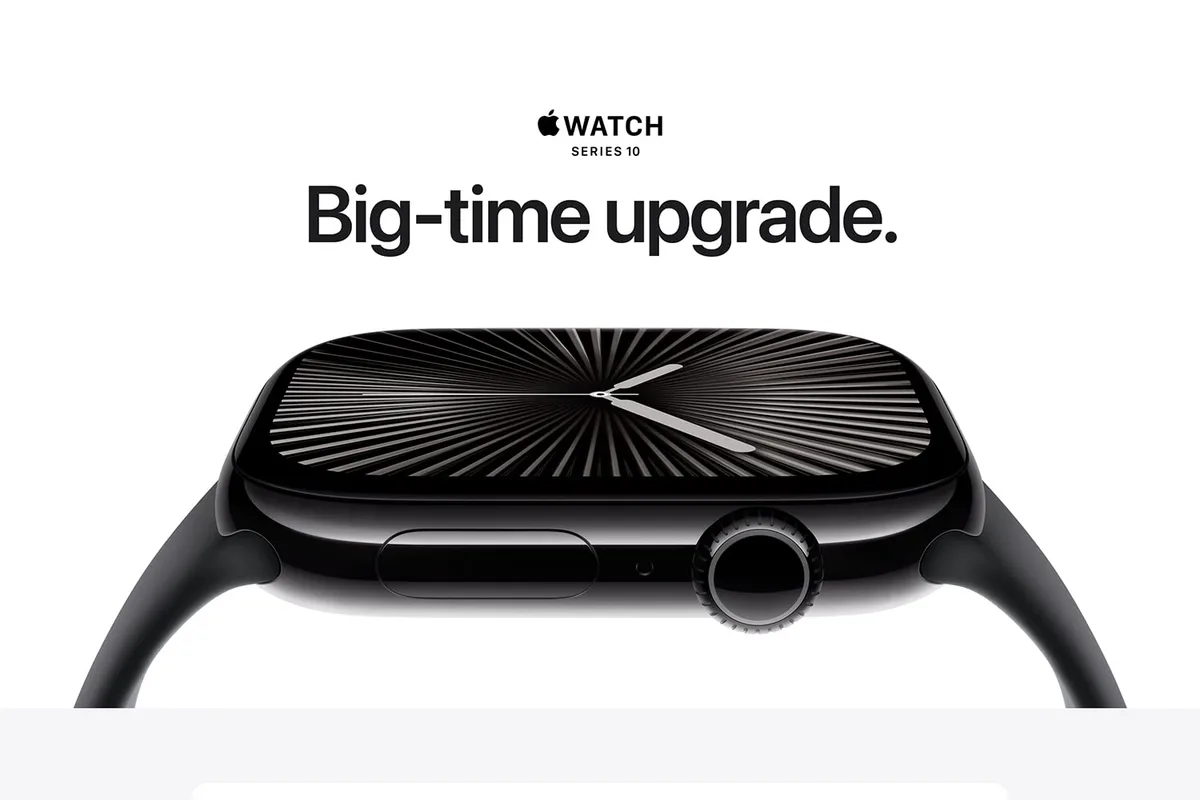
The Series 10 is the Apple Watch that finally feels like a complete health companion. The larger always-on display shows more at a glance, the thinner design wears comfortably, and the health suite covers workouts, sleep, heart-rate alerts, and even sleep apnea notifications. Fast charging makes the daily charge habit painless, and the watchOS app ecosystem remains the strongest in wearables. It requires an iPhone and the battery is still daily, but for Apple users it is the best smartwatch you can buy.
2. Samsung Galaxy Watch 7 — best for Android
Samsung Galaxy Watch 7
Best smartwatch for Android usersWhy it works
- Wear OS 5 with Galaxy AI insights
- Advanced bio-active sensor for body composition
- Durable design with sapphire glass
- GPS and comprehensive workout tracking
Tradeoffs
- Full Wear OS app support
- Accurate GPS
- Fast charging
- Best features need a Samsung phone
- Battery life around two days
The Galaxy Watch 7 is the Android smartwatch to beat. Wear OS 5 brings the full app ecosystem, the bio-active sensor adds body composition and advanced health tracking, and the durable build with sapphire glass survives daily life. GPS is accurate for runs and rides, and the two-day battery is respectable for a full smartwatch. The best features lean on Samsung phones, but it works well with most Android devices, making it the default recommendation for the platform.
3. Fitbit Charge 6 — best fitness-first pick
Fitbit Charge 6
Best fitness tracker for most peopleWhy it works
- Built-in GPS with workout intensity maps
- ECG app and heart-rate variability tracking
- Seven-day battery life
- Google integration for maps and payments
Tradeoffs
- Long battery
- Comfortable band
- Accurate heart-rate tracking
- Small screen
- Some insights need Premium
The Charge 6 is the tracker for people who want the fitness data without the smartwatch baggage. It tracks heart rate, sleep, and workouts with excellent accuracy, adds built-in GPS, and lasts a week per charge. It works with both iPhone and Android, and Google integration adds Maps and Wallet. The screen is small and the app pushes Premium subscriptions, but for fitness-first buyers it is the best value in this guide.
Comparison table
| Watch | Best for | Battery | GPS | Apps | Phone |
|---|---|---|---|---|---|
| Apple Watch S10 | iPhone users | ~1.5 days | Yes | Excellent | iPhone only |
| Galaxy Watch 7 | Android users | ~2 days | Yes | Full Wear OS | Android |
| Fitbit Charge 6 | Fitness first | ~7 days | Yes | Minimal | iOS + Android |
How to choose a smartwatch
Start with your phone. iPhone users should buy Apple Watch, and Android users should start with Galaxy Watch or a Wear OS model. Then decide smartwatch versus tracker: if you want apps, payments, and notifications, buy a smartwatch; if you want battery life and focused fitness data, buy a tracker.
Look at battery life honestly. A watch you have to charge every night is fine if you wear it all day, but a tracker fits better if you want sleep tracking without a charging routine. Then compare the health features you will actually use: GPS for runners, sleep staging, heart-rate alerts, or ECG.
Setting up and getting the most from your smartwatch
Set up notifications deliberately, or the watch becomes a second phone on your wrist. During the first pairing, allow notifications only from apps that genuinely matter: messages, calendar, and one or two work apps. Every additional app adds vibrations, screen wake-ups, and battery drain, and the feature you will appreciate most is the silence from everything else.
Customize the watch face for glanceability. Put the complications you actually check first: date, next calendar event, heart rate, weather, or steps. A busy face with eight complications looks impressive but takes longer to read than a clean face with three. Also set the raise-to-wake gesture and screen brightness for your environment, because a watch you cannot read outside is a watch you stop checking.
For health tracking to work, wear the watch consistently and let it learn your baseline. Keep the fit snug but not tight, and position the watch above the wrist bone as the manufacturer recommends. Sync with the companion app daily and review the trends weekly rather than checking single measurements, since heart rate, sleep stages, and readiness scores are most useful as patterns.
Finally, build a charging routine that fits your habits. If the watch charges daily, charge it while you shower or work at your desk in the evening; if it lasts several days, set a reminder for the same day each week. Use the included charger only at first, and if you buy a third-party charger, check the wattage and connection quality, because a poor charger can cause heat or slow charging over time.
What not to overpay for
Do not pay for LTE unless you run or leave your phone behind regularly. Do not pay for titanium or premium bands unless the durability matters to you. Skip watches with health features you will never use, and avoid buying a flagship watch if a mid-range model covers your workouts and notifications.
Final verdict
Choose the Apple Watch Series 10 for iPhone, the Galaxy Watch 7 for Android, and the Fitbit Charge 6 for fitness-first buyers. Match the watch to your phone first, be honest about battery habits, and remember that the best wearable is the one you actually wear every day.